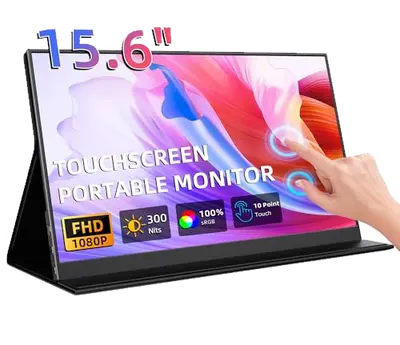
Touch-enabled travel screen
Touchscreen Portable Monitor 15.6-inch
by Pornitor
Independent guide. Not the official Pornitor site.
A 15.6-inch 1080p IPS touchscreen monitor from Pornitor that weighs 1.2 lb without its cover and connects by USB-C or mini HDMI.
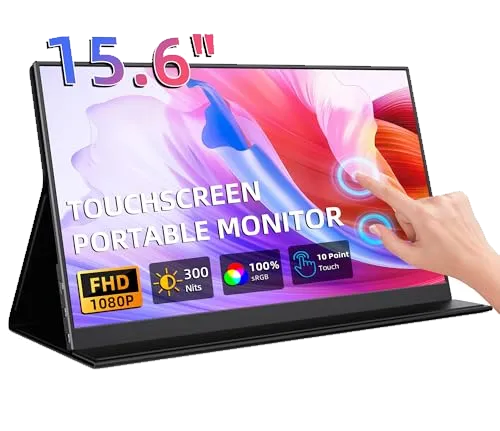
Today's price and delivery date are shown on Amazon.
Check price on Amazon Read customer reviews on AmazonAs an Amazon Associate I earn from qualifying purchases.
Is it the right one for you?
Choose it if
- You want touch input on a second screen and your laptop has a full-featured USB-C port that carries power, video and touch over one cable.
- You need a screen that is 0.20 in thin at its minimum and 0.35 in at its maximum, so it slips into a bag.
- You plan to connect a game console or other HDMI device and want built-in speakers plus a cover that works as a stand.
- You want to plug a wired mouse or keyboard into the monitor's OTG port.
Pick another if
- You want a screen that clips onto the back of your laptop lid instead of sitting on a desk, with two stacked panels → Stacked Dual Monitor 15.6-inch
- You want three screens in one laptop extender, 14-inch size → Z140 Triple Extender 14-inch
- You want a single clip-on extender at the same 15.6-inch size → Z156Y21D Single Extender 15.6-inch
Key numbers
15.6 inScreen size
1.2 lbMonitor only
300 nitsBrightness
10-pointTouch
Before you buy
- Check that your laptop's USB-C port supports DisplayPort Alt Mode or is a Thunderbolt 3/4 port. The maker lists Type-C 3.1 DP ALT-MODE and Thunderbolt 3/4 for the single-cable setup. A data-only USB-C port will leave the screen dark, and if your laptop has two USB-C ports, try both.
- If the USB-C port does not support video, use the mini-HDMI route. It needs the included HDMI cable plus the USB-A cable for power, since HDMI does not carry power.
- Touch needs the full-featured USB-C connection. On a MacBook, the maker says only single-touch works, and you place the mouse pointer on this monitor to make it respond to touch.
- The maker states that iPhone, iPad and gaming devices are not supported for touch. They can still show video where the connection allows, but touch will not work.
- Mac owners should know the monitor works with MacOS, but the maker does not state which chips or how many screens a Mac can run. Check your Mac's external display limits before you order.
- The screen is 300 nits with a matte finish. That suits indoor use, and direct sunlight will make it harder to read.
- The 1.2 lb weight is for the monitor alone. The cover is supplied separately in the box, and the PU leather pouch doubles as the stand.
Why it works
10-point touch input
The screen takes up to ten touch points when linked by a full-featured Type-C port. The maker lists Windows and MacOS support.
One cable or HDMI
A single USB-C to USB-C cable carries power, video and touch. Otherwise the included HDMI and USB-A cables connect HDMI devices.
1080p IPS panel
The 15.6-inch display is 1920x1080 with a 178° viewing angle, 1000:1 contrast and 100% sRGB. Pornitor also lists an optional HDR mode.
Eye comfort settings
Blue light reduction and flicker-free technology are listed. The finish is matte, which cuts glare indoors.
Thin and light
It is 0.20 in thick at the minimum and 0.35 in at the maximum, and weighs 1.2 lb without the cover.
Cover that stands up
The PU leather pouch protects the screen and doubles as a stand, so it sits on a desk or table.
Built-in speakers
Two speakers are built in, which helps when the monitor is connected to a console or a laptop with weak audio.
Ports for accessories
It has 2 Type-C ports and 1 mini-HDMI port. An extra OTG port is meant for a wired mouse or keyboard.
Specifications
| Screen size | 15.6 inches |
|---|---|
| Resolution | 1920x1080 (FHD 1080p) |
| Panel | IPS, matte finish |
| Brightness | 300 nits |
| Contrast ratio | 1000:1 |
| Refresh rate | 60 Hz |
| Weight | 1.2 lb (monitor only) |
| Ports | 2 USB-C, 1 mini-HDMI, OTG |
What's in the box
- Portable monitor
- Smart cover
- USB-C to USB-C cable
- HDMI cable
- USB-A cable
Questions & answers
Does the touchscreen work on a MacBook?
Yes, with limits. The maker says a MacBook supports single-touch only, and you place the mouse pointer on this monitor to make it respond to touch.
Will touch work with my iPhone, iPad or game console?No, the maker states that iPhone, iPad and gaming devices are not supported for touch functionality.
Why is my screen dark when I connect it by USB-C?Your laptop's USB-C port probably lacks DisplayPort Alt Mode. Pornitor lists Type-C 3.1 DP ALT-MODE or Thunderbolt 3/4 ports for the single-cable setup. Try another port or switch to the HDMI and USB-A cables.
What comes in the box?The box has the monitor, a smart cover, a USB-C to USB-C cable, an HDMI cable and a USB-A cable. The maker says it ships with all necessary cables.
How bright is it, and can I use it outside?It is rated at 300 nits with a matte finish, which suits indoor rooms. In direct sunlight the screen will be hard to see, so find shade.
How is it different from the Pornitor clip-on extenders?This is a desk monitor with touch and its own stand cover. Pornitor's extenders such as the Z156Y21D Single Extender 15.6-inch mount onto a laptop.
How long is the warranty?The maker lists a 1-year warranty and 24/7 service.
Compare Pornitor models
| Touchscreen Portable Monitor 15.6-inch | 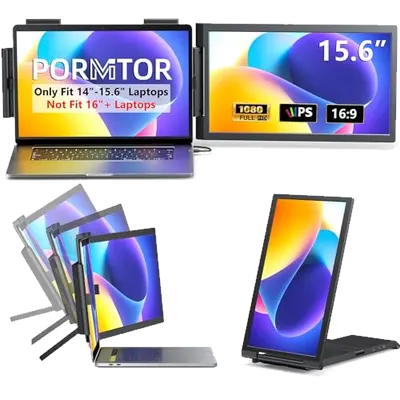 Z156Y21D Single Extender 15.6-inch | |
| Check price on Amazon | Check price on AmazonDetails |