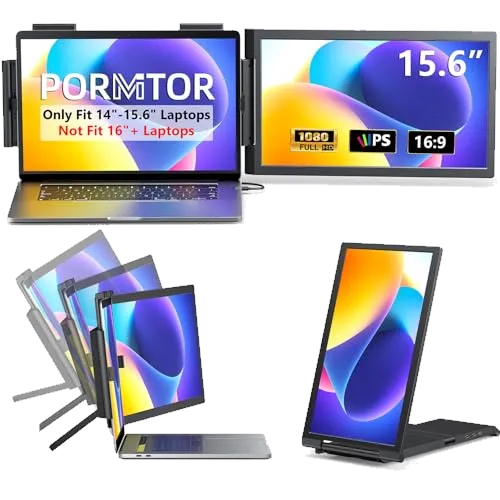
Single screen for 14–15.6 in laptops
Z156Y21D Single Extender 15.6-inch
by Pornitor
Independent guide. Not the official Pornitor site.
A single 15.6-inch 1080p IPS screen that attaches to 14 to 15.6 inch laptops, with a Mini HDMI fallback if USB-C carries no video.
Today's price and delivery date are shown on Amazon.
Check price on Amazon Read customer reviews on AmazonAs an Amazon Associate I earn from qualifying purchases.
Is it the right one for you?
Choose it if
- You want one extra screen rather than two or three, sized for a 14 to 15.6 inch laptop.
- Your laptop may have a USB-C port that carries power only, since the Mini HDMI cable gives you a video route.
- You switch between desks, sofas and cafe tables, and the maker lists 250° of rotation and a carry bag.
- You work in documents, code or trading screens and want a 1920×1080 IPS panel with 100% sRGB listed.
Pick another if
- You want two extra screens stacked on a 14-inch laptop setup → Z140Y21D Dual Extender HDMI 14-inch
- You want three screens in total with a 14-inch triple extender → Z140 Triple Extender 14-inch
- You want a stand-alone 15.6-inch touchscreen instead of a clip-on → Touchscreen Portable Monitor 15.6-inch
How big is it?
15.6 inScreen size
1920×1080Resolution
2.34 lbWeight
250°Rotation
Before you buy
- Check that your laptop is 14 to 15.6 inches, the range the maker lists for this extender. Pornitor, as a clip-on, also needs a laptop with a firm hinge to carry the extra weight.
- Look in your laptop's specs for a full-function USB-C port (DisplayPort Alt Mode or Thunderbolt). A port that only charges or moves data will show 'No Signal'.
- If USB-C shows no signal, the maker says to connect an HDMI cable to the monitor's extended port. Your laptop then needs an HDMI port as well as a USB-C port.
- Mac owners should confirm how their chip handles external displays. The maker lists Mac as compatible, but base M-series chips may only mirror over a single USB-C cable, so check your model.
- Brightness is listed at 300 cd with an anti-glare matte finish. That suits indoor rooms and shade, and direct sunlight will still wash it out.
- The screen runs at 60 hertz, which suits work and video. Competitive gaming needs more than that.
- After connecting, open your display settings and choose extend rather than mirror so the screen acts as a second desktop.
Why it works
Sized for 14–15.6 inch laptops
The maker lists compatibility with laptops from 14 to 15.6 inches. The panel measures 9.7 by 13.7 inches and is 0.2 inches thick.
One cable to start
A single USB-C to USB-C cable connects it when your laptop's port carries video. No driver is required.
HDMI fallback
If the USB-C port is power only, a Mini HDMI to HDMI cable supplies the video signal through the extended port.
1080p IPS panel
The native resolution is 1920×1080 on an IPS panel with a 16:9 ratio. The maker lists 1000:1 contrast and 100% sRGB.
Works across devices
The maker lists Windows, Mac, Chrome, Android, Linux, Dex and Switch. Gaming consoles and smartphones appear among compatible devices.
Carry bag included
It weighs 2.34 lb and slides into the bundled carry bag for travel or the office.
Specifications
| Screen size | 15.6 inches |
|---|---|
| Resolution | 1920×1080 (FHD) |
| Panel | IPS LED, matte |
| Refresh rate | 60 hertz |
| Brightness | 300 cd |
| Dimensions | 0.2×9.7×13.7 inches |
| Weight | 2.34 lb |
| Warranty | 3 years (maker listed) |
What's in the box
- 15.6 inch laptop screen extender
- User manual
- USB-C to USB-C cable
- USB-A to USB-C cable
- Mini HDMI to HDMI cable
- Carry bag
Questions & answers
Will it fit my laptop?
The maker lists it for 14 to 15.6 inch laptops. Your laptop also needs a firm hinge, because the screen attaches to the back of the lid and adds weight.
Why does my screen say No Signal over USB-C?Your laptop's USB-C port most likely supports power only, according to the maker. Connect the Mini HDMI to HDMI cable to the monitor's extended port to get a video signal.
Does it work with a Mac?Yes, the maker lists Mac as compatible. Base M-series chips are limited to one external display over a single USB-C cable, so check your chip first.
What comes in the box?The box has the 15.6 inch extender, a user manual, a USB-C to USB-C cable, a USB-A to USB-C cable and a Mini HDMI to HDMI cable. A carry bag is also included.
How is it different from the Z156Y21D's dual and triple siblings?This model adds one screen. The Pornitor Z140Y21D Dual Extender and Z140 Triple Extender add more screens at 14 inches.
Is it bright enough for outdoors?The maker lists 300 cd with an anti-glare matte finish. That suits indoor and shaded use, but direct sun will challenge it.
Compare Pornitor models
| Z156Y21D Single Extender 15.6-inch | 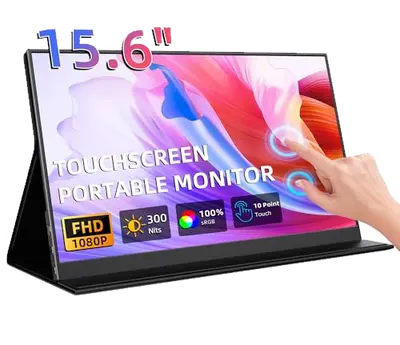 Touchscreen Portable Monitor 15.6-inch | |
| Check price on Amazon | Check price on AmazonDetails |