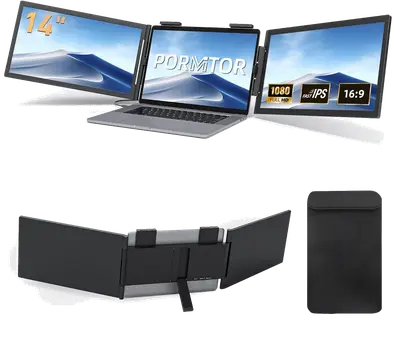
Triple screen, 14–15.6 in laptops
Z140 Triple Extender 14-inch
by Pornitor
Independent guide. Not the official Pornitor site.
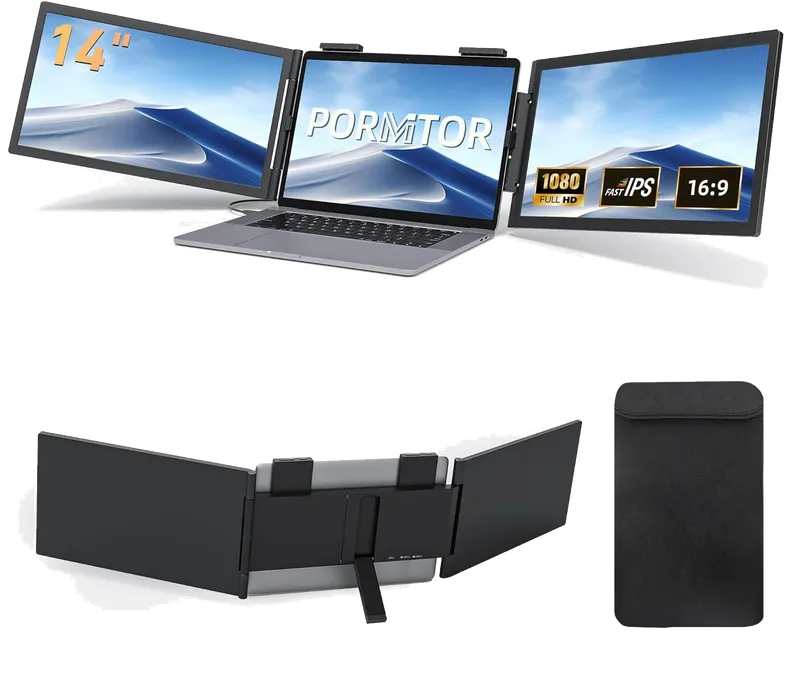
Pornitor Z140 is a triple-screen extender that clips onto 14–15.6 inch laptops and adds two 14-inch 1080p IPS displays over USB-C.
Today's price and delivery date are shown on Amazon.
Check price on Amazon Read customer reviews on AmazonAs an Amazon Associate I earn from qualifying purchases.
Is it the right one for you?
Choose it if
- You want two extra 14-inch screens beside your laptop, giving a three-screen desktop in extend mode.
- Your laptop screen is 14–15.6 inches and its width falls between 12.1 and 14.3 inches.
- You need portrait orientation for reading or code, which the 250° adjustable stand allows.
- You run a Windows laptop with a full-featured USB-C port that supports DP Alt Mode and want one cable for both screens.
Pick another if
- You only need one added screen and a 15.6-inch size → Z156Y21D Single Extender 15.6-inch
- You want two screens instead of three on a 14-inch laptop, with USB-C or HDMI → C140 Dual Extender USB-C/HDMI 14-inch
- You want a standalone touchscreen monitor rather than a clip-on extender → Touchscreen Portable Monitor 15.6-inch
Key numbers
14 inScreen size
1920x1080Resolution
300 cdBrightness
250°Stand adjustment
Before you buy
- Check that your laptop's USB-C port supports DisplayPort Alt Mode. A USB-C port that only carries data will leave the screens dark.
- Measure your laptop's width. The maker lists compatibility for widths of 12.1–14.3 inches, and silicone pads on the clips allow use with 13-inch laptops.
- On a MacBook with a base M1, M2, M3 or M4 chip, one USB-C cable mirrors one screen only. Pro and Max chip laptops need the dual USB-C cable connection for extended display.
- On Windows, one USB-C cable is the maker's setup. If the port outputs less than 5V/3A, add extra power.
- The maker recommends a 110° stand angle for optimal support, so your laptop hinge should be firm enough to hold the added screens upright.
- The maker lists this model as 1920x1080 at 60 hertz with 300 cd brightness, which suits indoor work more than direct sunlight.
Why it works
Two screens from one cable
On Windows laptops, the maker says a single USB-C connection drives both 1080p displays with no drivers.
Extend, mirror or portrait
You can run a three-screen desktop, mirror your display for presentations, or turn the screens to portrait.
250° adjustable stand
The stand adjusts through 250°, which lets you angle the screens or rotate them for portrait use.
Works with many devices
The maker lists Windows, Mac, ChromeOS, Linux, Android, Switch and Dex as compatible systems.
Matte finish
The anti-glare matte screens have a 178 degree viewing angle and 1000:1 contrast ratio.
Slim body
Item dimensions are 1.2 in deep, 13.4 in wide and 7.9 in tall, and a carry bag is included.
Specifications
| Screen size | 14 inches |
|---|---|
| Resolution | 1920x1080 (FHD 1080p) |
| Brightness | 300 cd |
| Refresh rate | 60 hertz |
| Panel | LCD, matte finish, 178 degree viewing angle |
| Dimensions | 1.2 in D x 13.4 in W x 7.9 in H |
| Connection | USB Type C |
| Color | Black |
What's in the box
- Laptop screen extender
- USB-C to USB-C cable (2)
- Adapter
- Carry bag
- User manual
Questions & answers
Will it fit my laptop?
It fits most 14–15.6 inch laptops with a width of 12.1–14.3 inches, according to the maker. Silicone pads on the clips make it usable with 13-inch laptops.
Does it work with a MacBook?Yes, but with limits. On M1, M2, M3 and M4 base models, one USB-C cable mirrors a single screen. Pro and Max chip laptops can extend the display using the dual USB-C cable connection.
Why does it show No Signal?Most often the USB-C port lacks DisplayPort Alt Mode. The maker requires a full-featured USB-C port, so try another port on your laptop or check its specs.
What comes in the box?The box holds the extender, two USB-C to USB-C cables, an adapter, a carry bag and a user manual.
Does it need extra power?On Windows, the maker says one USB-C cable is enough if the port outputs 5V/3A. If it outputs less, use extra power.
What is the warranty?The manufacturer lists a 1 year warranty.
Compare Pornitor models
| Z140 Triple Extender 14-inch | 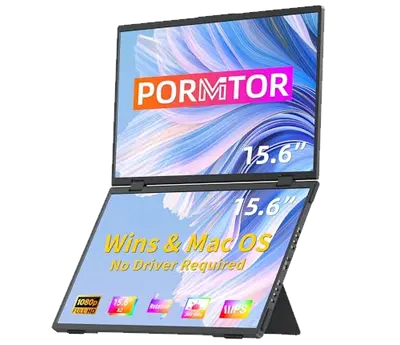 Stacked Dual Monitor 15.6-inch | |
| Check price on Amazon | Check price on AmazonDetails |